TypeORM query profiling
Capture every TypeORM SQL query and inspect duration and slow queries in the profiler's Database panel.
This tutorial shows how to add the TypeORM collector to profile SQL queries in a NestJS application that uses PostgreSQL via @nestjs/typeorm.
Prerequisites
@eleven-labs/nest-profilerinstalled and configured@nestjs/typeormandtypeorminstalled with a workingDataSource
Step 1 - Install the package
pnpm add @eleven-labs/nest-profiler-typeorm@alphaStep 2 - Register the collector
Add TypeOrmCollectorModule after TypeOrmModule in your root module:
import { TypeOrmModule } from '@nestjs/typeorm';
import { ConditionalModule } from '@nestjs/config';
import { ProfilerModule } from '@eleven-labs/nest-profiler';
import { TypeOrmCollectorModule } from '@eleven-labs/nest-profiler-typeorm';

const isProfilerEnabled = (env: NodeJS.ProcessEnv) => env['PROFILER_ENABLED'] === 'true'

@Module({
  imports: [
    TypeOrmModule.forRootAsync({ ... }),
    ConditionalModule.registerWhen(ProfilerModule.forRoot({ isGlobal: true }), isProfilerEnabled),
    ConditionalModule.registerWhen(
      TypeOrmCollectorModule.forRoot({ slowThreshold: 100 }), // queries > 100ms highlighted
      isProfilerEnabled,
    ),
  ],
})
export class AppModule {}
No other configuration is needed - the collector injects the DataSource automatically via @InjectDataSource().
Step 3 - Instrument your services with spans
Use startSpan() to add meaningful labels to the Timeline panel alongside your TypeORM calls:
import { ProfilerService } from '@eleven-labs/nest-profiler';

@Injectable()
export class ProductsService {
  constructor(
    @InjectRepository(Product) private readonly repo: Repository<Product>,
    private readonly profiler: ProfilerService,
  ) {}

  async findAll(): Promise<Product[]> {
    const stop = this.profiler.startSpan('db.products.findAll');
    const result = await this.repo.find({ order: { createdAt: 'DESC' } });
    stop();
    return result;
  }
}
Step 4 - Test it
Start your application and make a request that triggers a database query:
curl -i http://localhost:3000/api/v1/productsCopy the X-Debug-Token from the response headers, open /_profiler/{token}, and click the Database tab.
You will see:
- Each SQL query with its type badge (
SELECT,INSERT, …) - Duration per query with a bar chart indicator
- Slow queries and N+1 patterns flagged as performance tags
- Bound parameters
The Timeline panel shows the db.products.findAll span alongside other phases.
Driving options from ConfigService
Use forRootAsync() to resolve the options from ConfigService (or any provider), gated per environment with ConditionalModule — the recommended way (for the enabled flag, see Enabling and disabling the profiler):
import { ConditionalModule, ConfigService } from '@nestjs/config';

ConditionalModule.registerWhen(
  TypeOrmCollectorModule.forRootAsync({
    inject: [ConfigService],
    useFactory: (config: ConfigService) => ({
      slowThreshold: config.get<number>('PROFILER_SLOW_QUERY_MS') ?? 50,
    }),
  }),
  isProfilerEnabled,
);
How it works
The collector patches TypeORM's createQueryRunner() to time every query and record it into the active request profile. Streaming reads (QueryBuilder.stream()) are captured too and flagged as streaming. See How it works on the package page for the full mechanism and the exact set of captured queries.
Synchronize in production
Never use synchronize: true in production. It auto-migrates the schema on startup and can cause
data loss. Use TypeORM migrations instead.
Explain slow queries
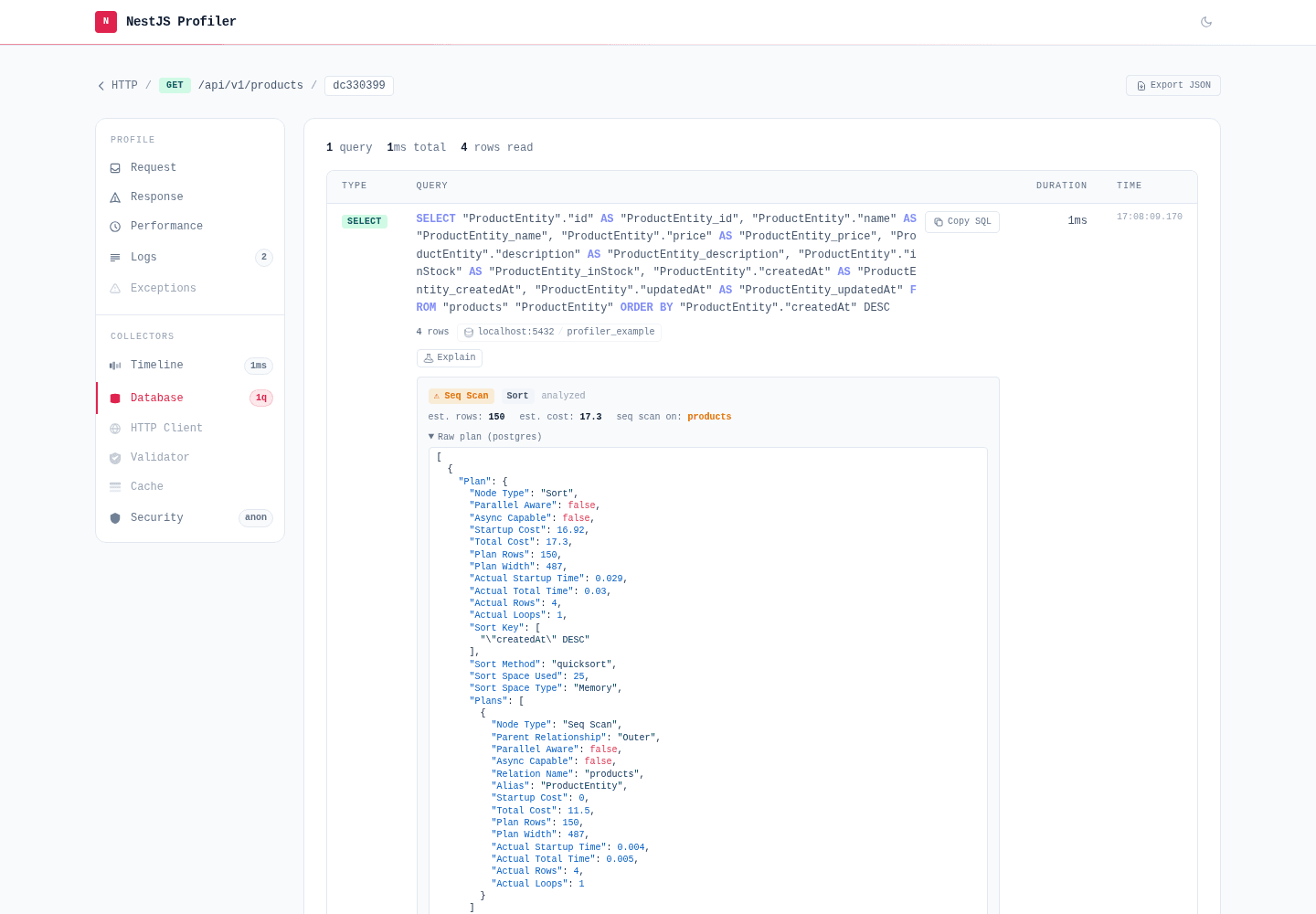
Each query in the Database panel has an Explain button. Click it and the profiler runs EXPLAIN for that one query over your DataSource and renders the execution plan inline — the top plan node, a ⚠ warning when it does a full-table (sequential) scan, the scanned relations, estimated rows/cost, and the raw plan. Supported dialects: PostgreSQL, MySQL/MariaDB and SQLite.
It runs on demand only — nothing happens until you click, so the profiled request is never slowed. EXPLAIN alone does not execute the statement; the opt-in analyze variant (EXPLAIN ANALYZE) does run the query and is therefore restricted to SELECT.
TypeOrmCollectorModule.forRoot({
  explain: { enabled: true }, // default; set `enabled: false` to hide the button
  // explain: { analyze: true }, // dev only — runs the query to measure real timings (SELECT only)
});
Runs against your database
The captured SQL and its parameters are replayed on the live connection when you click, so the
action sits behind the profiler's security. Values that looked like credentials were redacted at
capture, so a plan for such a query may differ slightly from production.
Inspect the schema
Alongside the per-request Database panel, the package ships TypeOrmSchemaCollectorModule — a global collector that adds a Schema · TypeORM panel to the profiler home page. It introspects the DataSource once at startup and lists every registered entity with its columns, relations and indexes, so you can recall an entity's shape without leaving the profiler.
Register it next to the query collector, gated the same way:
import { TypeOrmSchemaCollectorModule } from '@eleven-labs/nest-profiler-typeorm';

ConditionalModule.registerWhen(TypeOrmSchemaCollectorModule.forRoot(), isProfilerEnabled),
Open /_profiler and expand the Schema · TypeORM panel:
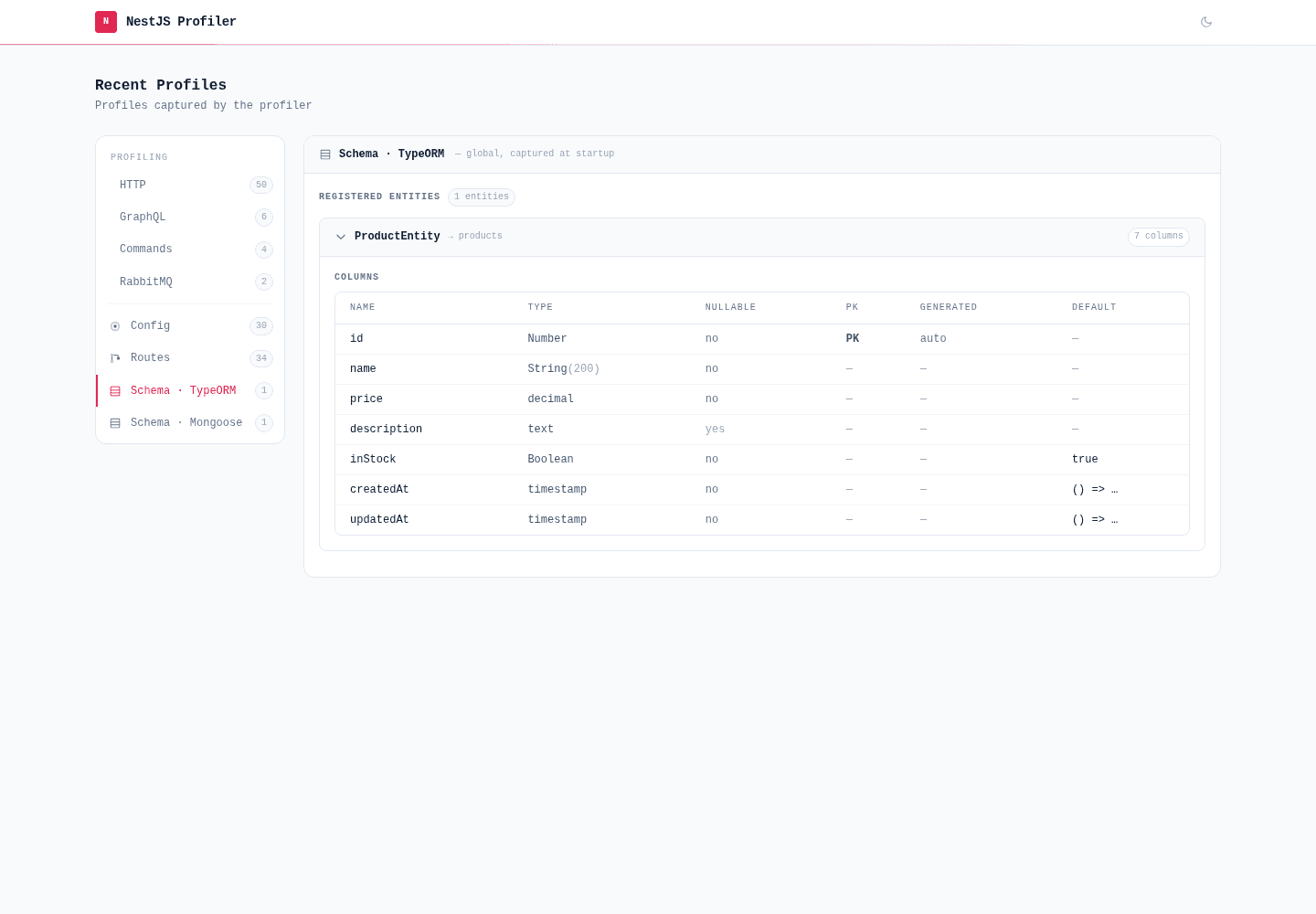
The panel is introspection-only (it never touches data), honours a connectionName option for named DataSources, redacts secrets embedded in column defaults, and simply does not appear when no DataSource is wired.