nest-profiler-mikro-orm
Profile MikroORM SQL queries in the Database panel.
@eleven-labs/nest-profiler-mikro-orm
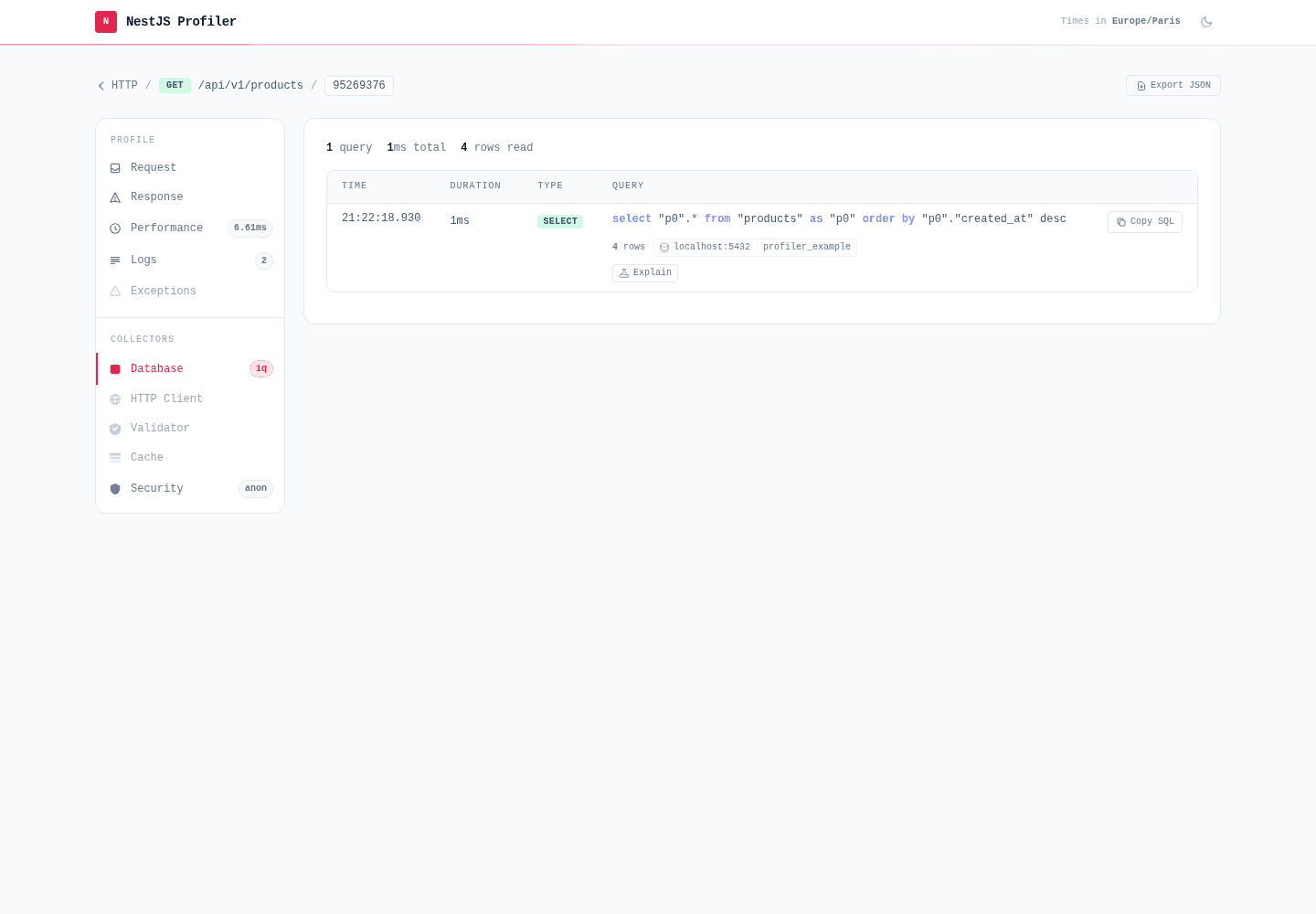
@eleven-labs/nest-profiler-mikro-orm captures every SQL query executed by MikroORM during a profiled execution and displays them in a dedicated Database panel.
Installation
pnpm add @eleven-labs/nest-profiler-mikro-ormPeer dependencies: @mikro-orm/core ^7.0.0, @mikro-orm/nestjs ^7.0.0
Setup
Register MikroOrmCollectorModule after MikroOrmModule in your root module. No extra MikroORM
configuration is required — the collector wraps the ORM logger automatically:
import { Module } from '@nestjs/common';
import { ConditionalModule } from '@nestjs/config';
import { MikroOrmModule } from '@mikro-orm/nestjs';
import { PostgreSqlDriver } from '@mikro-orm/postgresql';
import { MikroOrmCollectorModule } from '@eleven-labs/nest-profiler-mikro-orm';

const isProfilerEnabled = (env: NodeJS.ProcessEnv) => env['PROFILER_ENABLED'] === 'true';

@Module({
  imports: [
    MikroOrmModule.forRoot({
      driver: PostgreSqlDriver,
      // ...your connection options
    }),
    ConditionalModule.registerWhen(
      MikroOrmCollectorModule.forRoot({
        slowThreshold: 100,
        nPlusOneThreshold: 2,
        slowSeverity: 'warning',
      }), // slow/N+1 tagging + severity
      isProfilerEnabled,
    ),
  ],
})
export class AppModule {}
Enabling / disabling — gate the collector with
ConditionalModule.registerWhen(..., isProfilerEnabled)as shown, so it loads only whenPROFILER_ENABLEDis on. Wire the coreProfilerModuleonce at the root — the recommended setup bundles the root-level profiler modules into a singleProfilingModulebehind aConditionalModulegate (see Enabling and disabling the profiler and the example app). A top-levelenabledoption is also supported as an alternative.
What it collects
For each SQL query executed during a request:
| Field | Description |
|---|---|
sql | The SQL query string (with keyword highlighting) |
parameters | Bound parameters |
duration | Execution time in ms (from MikroORM's took) |
type | SELECT, INSERT, UPDATE, DELETE, OTHER |
startedAt | Unix timestamp |
error | Set when MikroORM reports the query at error level |
streaming | true for streaming reads (QueryBuilder.stream(), duration: 0) |
rowCount | Rows affected (affected) or returned (results), from the log |
connection | Connection endpoint host:port, else the log's connection name |
database | Target database name (dbName) |
fingerprint | Parameter-free normalized SQL, used to group N+1s |
tags | Performance tags applied by the core rule engine |
Slow queries, N+1 patterns and silent zero-row UPDATE/DELETEs (the zero-rows tag) are flagged by the core rule engine and shown as coloured pills (and filterable on the list page). See Performance tags.
Toolbar badge
The toolbar badge shows: {n}q (e.g., 5q). When slow queries are present: 5q (2 slow).
How it works
The collector wraps MikroORM's Logger.logQuery at module initialization (OnModuleInit).
MikroORM's SQL connection always measures execution time and calls logQuery with the query, its
parameters and the elapsed took; the collector pushes a query entry into the active request
profile (resolved via nestjs-cls) and lets the original
logger handle console output only if you had query logging enabled. Queries executed outside a
request context (startup, background jobs) are silently ignored.
This captures all queries issued through the EntityManager, repositories and the QueryBuilder.
Streaming reads — QueryBuilder.stream() is captured too, since MikroORM's SQL connection calls logQuery for it like any other query. It is logged at stream start (before rows are consumed) with no took; a SELECT logged without took is therefore detected as a streaming read and flagged streaming: true (a normal query always carries took, and transaction/savepoint control is type OTHER). Its duration stays 0 — measuring the real value would require intrusively wrapping MikroORM's internal row generator, so it is left as a documented limitation. The panel labels such rows not timed (stream).
Schema panel
MikroOrmSchemaCollectorModule adds a global Schemas / MikroORM view to the profiler home page, listing every registered entity with its columns (type, nullable, primary key, generated, default), relations (kind → target) and indexes (name, columns, unique). Unlike the per-request Database panel, this is static process-level data introspected once at startup — so it renders on the home page, under the sidebar's Schemas heading, not inside a profile.
import { MikroOrmSchemaCollectorModule } from '@eleven-labs/nest-profiler-mikro-orm';

ConditionalModule.registerWhen(MikroOrmSchemaCollectorModule.forRoot(), isProfilerEnabled),
Pass connectionName to introspect a named MikroORM context (omit it for the default), and enabled: false to disable per environment. The panel reads orm.getMetadata() and never touches data; column defaults are passed through the profiler's redactString, so a default embedding a secret is masked. The panel no-ops (does not appear) when no MikroORM context is wired.